


Microsoft is preparing to make one of Windows 11’s newer recovery features a standard part of the operating system. Starting with Windows 11 version 26H2, Point-in-Time Restore will be enabled by default on eligible PCs, giving users another way to recover their systems after a failed update, software problem or other major issue.
Microsoft confirmed the change in an updated support document, saying the feature will be turned on automatically with Windows 11 26H2. Users whose PCs already support the feature do not need to wait for the new version, as Point-in-Time Restore can be enabled manually through Windows settings.
Point-in-Time Restore is designed to create automatic snapshots of a Windows PC at regular intervals. If something goes wrong, users can use one of these restore points to return the computer to an earlier working state.
The feature can restore more than basic Windows system files. A recovery point can include the operating system and its current build, installed applications, system settings, local account information and other local user accounts.
Microsoft’s approach is somewhat reminiscent of the older System Restore feature, but Point-in-Time Restore is intended to provide a more complete snapshot of the system. It also works locally, meaning users do not need an internet connection to retrieve the saved state.
The technology behind the feature relies on Microsoft’s Volume Shadow Copy Service, or VSS. This allows Windows to capture snapshots of files and volumes while the computer is still being used.
Restore points are kept for up to 72 hours
On consumer versions of Windows 11, Point-in-Time Restore creates a new restore point approximately every 24 hours. Microsoft keeps these snapshots for up to 72 hours before older recovery points are removed.
The settings are more flexible on Enterprise editions. Administrators can adjust how frequently restore points are created and how long they remain available. Enterprise systems can, for example, create restore points as often as every four hours and modify the retention period according to storage requirements.
Microsoft has also included a maximum storage usage control. The feature can consume as much as 50GB of storage, although users can reduce the amount of disk space allocated to recovery snapshots.
How Point-in-Time Restore differs from System Restore
Windows 11 will continue to include System Restore, but the two features serve different purposes.
System Restore is primarily designed to roll back system components, drivers, Registry settings and certain software changes. It does not function as a complete backup of a user’s personal files and documents.
Point-in-Time Restore takes a wider snapshot of the computer’s state and is intended to be used when a PC needs to be recovered from a serious problem. Because its restore points are generated automatically, users do not necessarily need to anticipate when something might go wrong.
That could make the feature particularly useful following problematic updates or software installations that leave a system unstable.
Users can enable the feature now
Point-in-Time Restore is being made available gradually across Windows 11 installations. On systems where the option is already present, users can enable it without waiting for Windows 11 26H2.
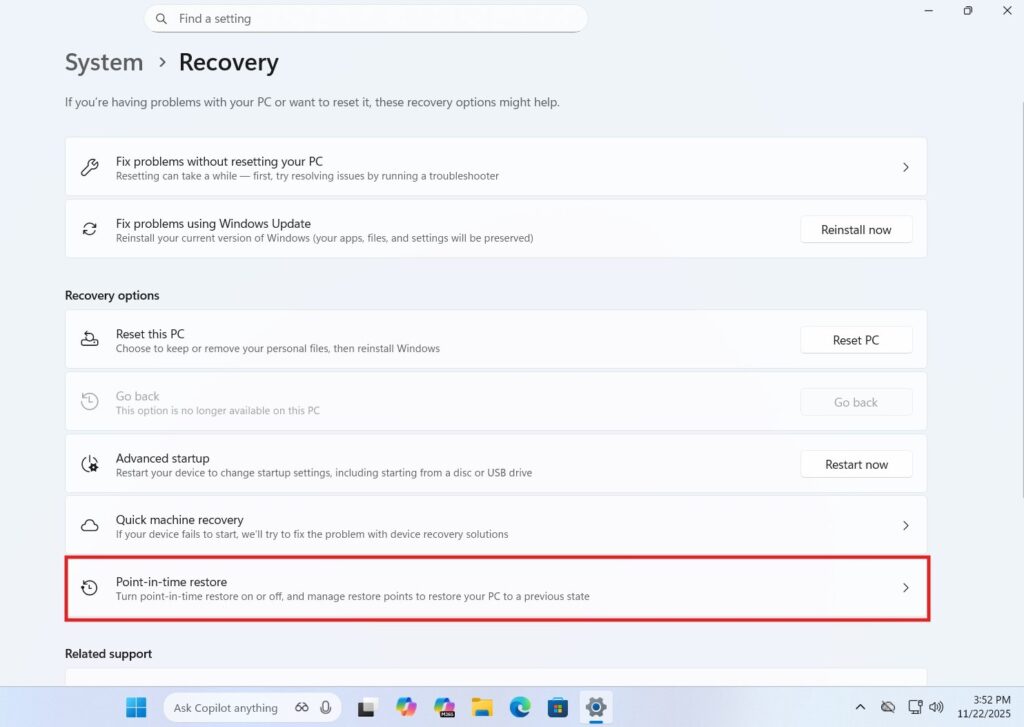
To check for the feature,
- Open Settings > System > Recovery and look for Point-in-Time Restore.
- If the option is available, users can switch it on from there.
The automatic rollout will have some hardware and storage requirements. Microsoft says the Windows operating system volume must be at least 200GB for the feature to be enabled automatically. PCs with smaller system drives may not receive automatic activation, although users can still enable the feature manually when supported.
Enterprise administrators can also prevent the feature from being enabled through Group Policy.
Windows 11 26H2 rollout is approaching
Windows 11 26H2 is expected to begin its broader rollout around late September or early October 2026. Microsoft is expected to move the release into the Release Preview Channel before the public launch, giving testers a final opportunity to identify issues.
The decision to enable Point-in-Time Restore by default marks a notable change in Microsoft’s recovery strategy. Rather than relying solely on users to create restore points before making major system changes, Windows will increasingly automatically maintain recent recovery states.
For users, the feature could provide a simpler way to recover from serious Windows problems without immediately resorting to a full system reset or cloud-based reinstallation.